How to Tune a Guitar
Learn standard E A D G B E guitar tuning, follow flat, sharp and in-tune indicators, adjust each string safely and fix common tuner problems.
A guitar can sound wrong even when your chords and rhythm are correct. Start by checking all six strings. Learn the standard tuning notes, then follow the tuner's prompts with small peg adjustments to bring each string into tune.
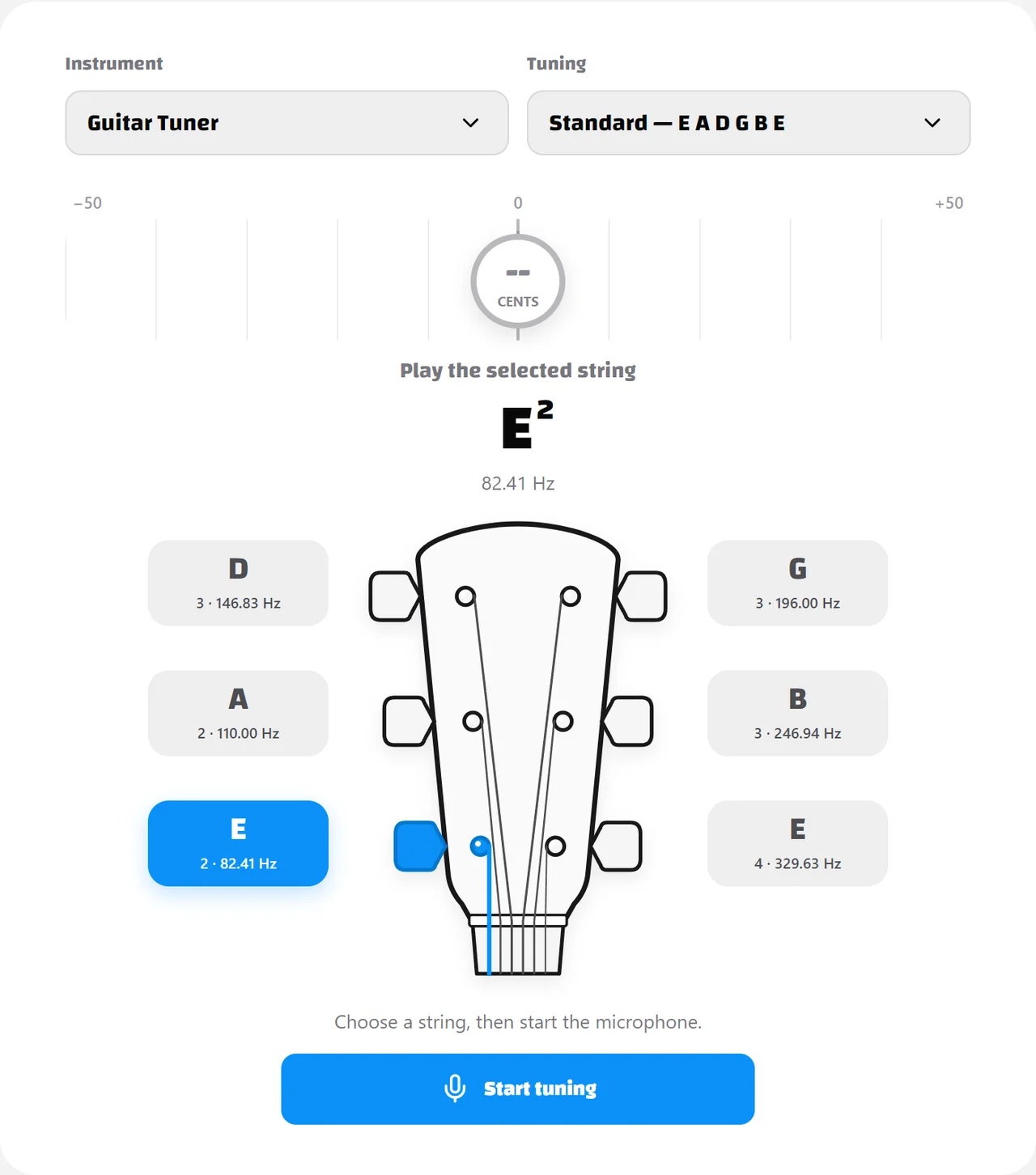
Know the standard guitar tuning notes
In standard tuning, the six open strings are E, A, D, G, B and E from the thickest string to the thinnest string. The two E strings share a note name but sound in different octaves: the sixth string is the low E2 and the first string is the high E4.
Learning this order is the first step in tuning confidently. Start with the sixth string and work across the instrument one string at a time.
| String | Note | Frequency |
|---|---|---|
| 6th (thickest) | E2 | 82.41 Hz |
| 5th | A2 | 110.00 Hz |
| 4th | D3 | 146.83 Hz |
| 3rd | G3 | 196.00 Hz |
| 2nd | B3 | 246.94 Hz |
| 1st (thinnest) | E4 | 329.63 Hz |
These targets use the A4 = 440 Hz reference. The small number in B3 or E4 identifies the octave, not the string number: B3 is the second string, while E2 and E4 are two different strings. You can keep this table beside the standard guitar tuner as you work.
Set up the online tuner
Use a quiet room and remove the capo for this standard open-string tuning exercise. A clip-on tuner senses vibration through the headstock; our browser tuner uses your device microphone, so nearby speech, music and other ringing strings can interfere with the reading.
- Open the standard guitar tuner. Check that the instrument is Guitar Tuner and the tuning is Standard, E A D G B E.
- Press Start and allow microphone access when your browser asks. If you previously blocked it, change the site's microphone permission in your browser settings before trying again.
- Select the string you are tuning. Its note button and the corresponding string on the headstock turn blue. This selects the target; it does not mean the string is already in tune.
- Pluck only that open string, without pressing a fret, and gently mute the others. Wait for a steady reading before adjusting its peg.
The large note shows your selected target, while the detected frequency reflects the pitch the microphone is actually hearing. Use the indicator's position, color and tuning prompt to decide whether the string needs adjusting.
Read the tuner: flat, sharp and in tune
The tuner tells you whether a string is flat, sharp or in tune. An indicator to the left means the pitch needs to go up; an indicator to the right means it needs to go down. When it settles near the center and turns green, stop adjusting.
A tuning peg changes the string's tension: tightening raises the pitch, and loosening lowers it. Peg direction varies between guitars, so do not memorize clockwise or counterclockwise as a universal rule. Turn slightly, pluck again and check which way the pitch moves.
| State | Tuner prompt | What to do |
|---|---|---|
| Flat | Indicator left of center; Tune up | Tighten the matching peg slightly, then pluck again |
| Sharp | Indicator right of center; Tune down | Loosen the matching peg slightly, then pluck again |
| In tune | Green indicator near the center | Stop adjusting and check with another gentle pluck |
Flat: tighten the string slightly
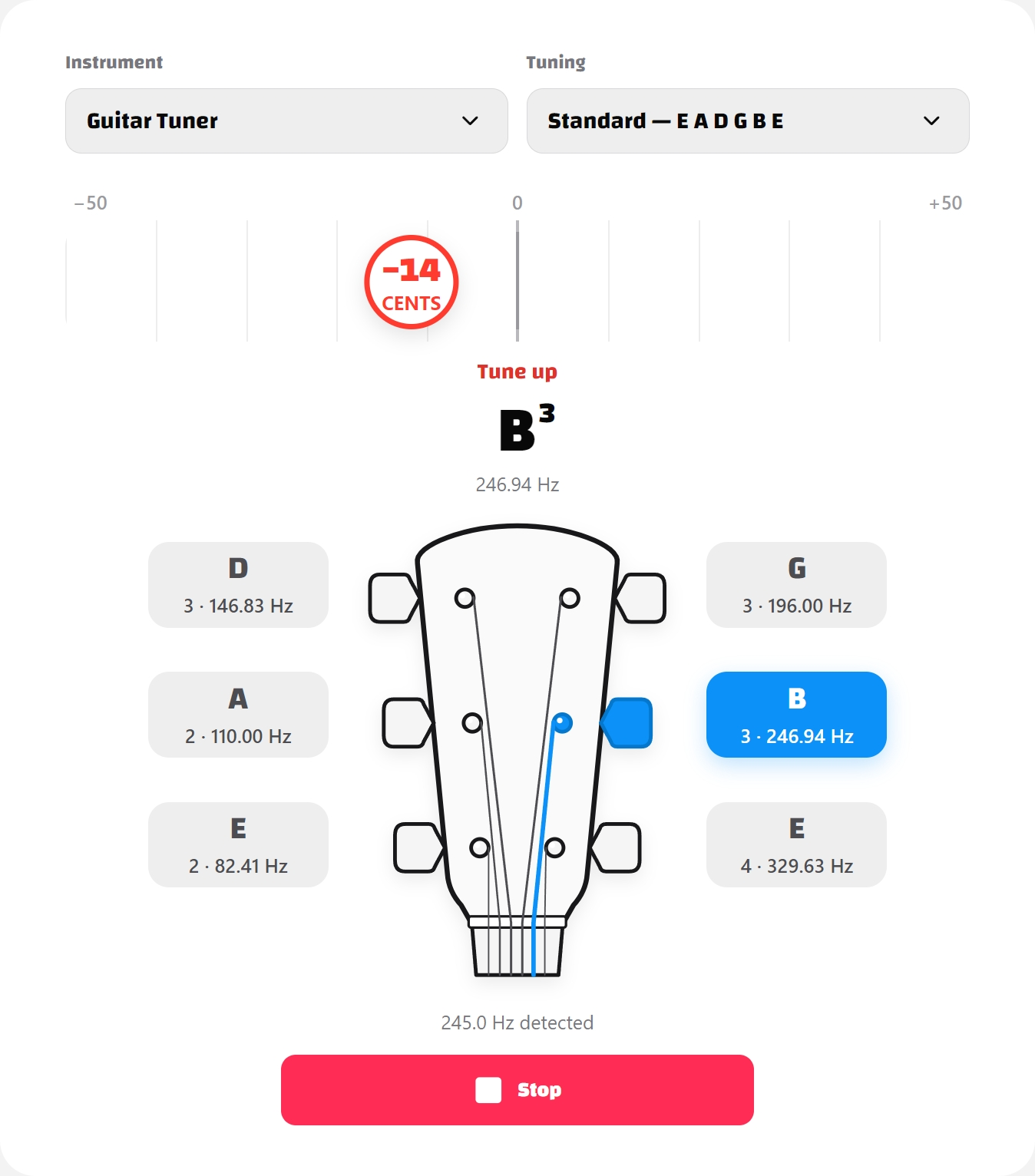
When a string is flat, gently tighten its matching peg to raise the pitch. Make one small turn, pluck again and watch the indicator move toward the center. Reduce each adjustment as you approach the target, especially on the thin first and second strings.
If the indicator moves farther from the center, stop and check the turning direction and that the peg belongs to the string you are playing. Do not keep tightening to force the meter to move.
Sharp: loosen the string slightly
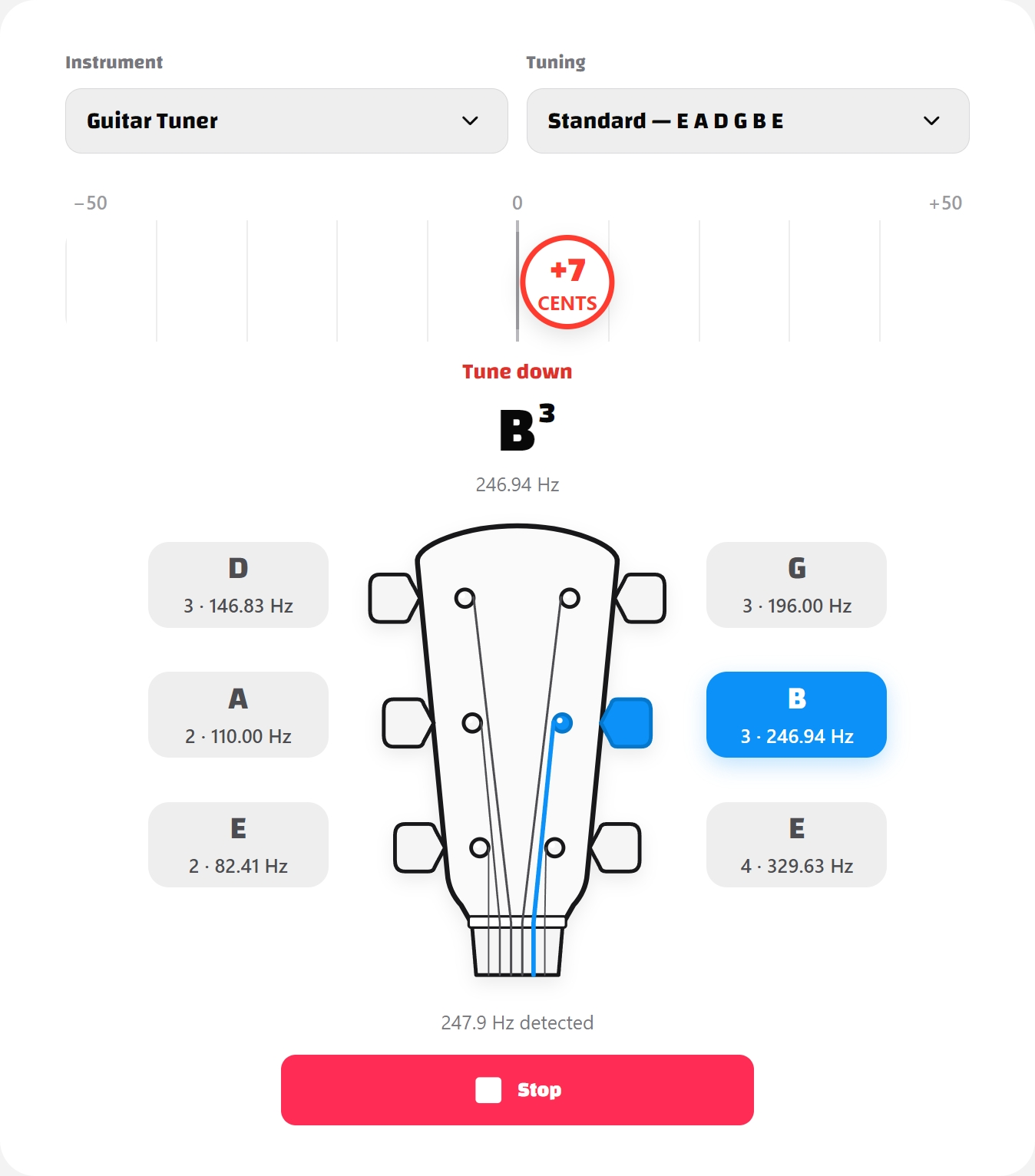
When a string is sharp, loosen its matching peg slightly to lower the pitch, then pluck again. If you overshot while tightening, bring it just below the target and slowly tune back up. Make patient, small adjustments rather than alternating between large turns in both directions.
In tune: stop adjusting and recheck
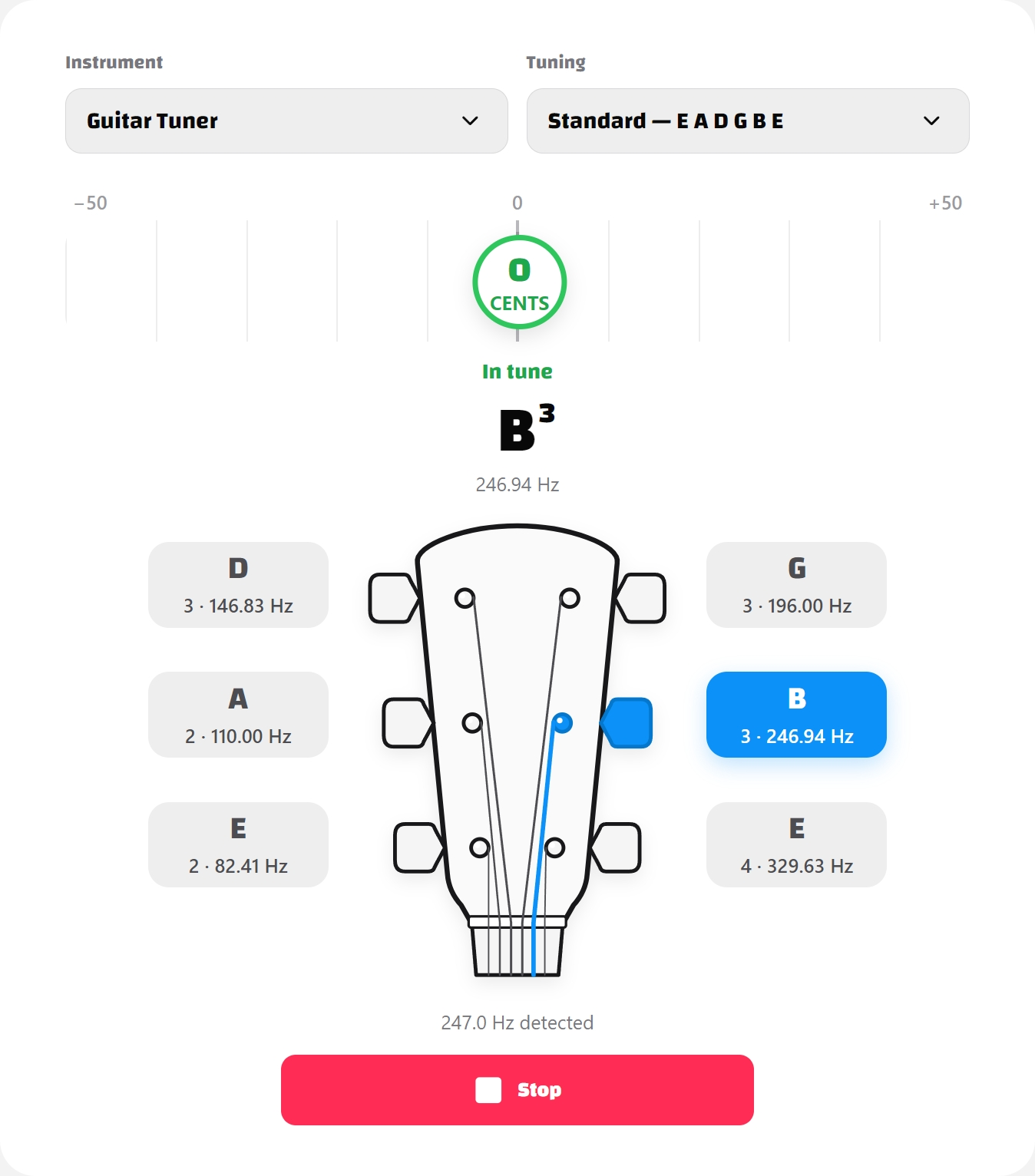
When the indicator settles near the center and stays green, stop turning the peg. Give the string another gentle pluck to confirm before moving to the next one. Small movements as a note fades are normal; do not chase every fluctuation with another adjustment.
Tune each string with a tuner
Repeat the same process for each target in the table. In our guitar mode, select the matching string before reading its deviation: a correctly tuned A string will still look wrong if the selected target is B. If you want to identify an unknown note instead, use the chromatic tuner.
- Select the sixth string, E2, and pluck the thickest open string.
- Make a small adjustment to that string's peg, then pluck again. Repeat until the reading settles near the center.
- Select A2, D3, G3, B3 and E4 in turn, tuning each corresponding string before moving on.
- After the first pass, return to E2 and check every string again.
Do not keep turning a peg while an old note fades. A weak signal is harder to read, so use a fresh, gentle pluck after each adjustment. Once you are finished, press Stop to end the microphone session.
Approach the target pitch from below
For more stable tuning, approach the target from a slightly lower pitch. If you tune past the note and become sharp, loosen the string until it is a little flat, then tighten it slowly back to the center. This helps remove slack around the tuning post and usually holds the final pitch more consistently.
This is also the approach demonstrated in Fender's flat-to-sharp tuning tip.
Avoid large, continuous turns. If a string already feels unusually tight or keeps rising without showing the expected note, stop and check that you are adjusting the correct peg. Forcing a thin string far above its normal pitch can break it.
Check all six strings a second time
After the first pass, return to the low E string and check every string again. Changing one string's tension can slightly affect the neck, bridge and the pitch of the other strings. A guitar that was badly out of tune, or one fitted with new strings, may need two or three passes before every note remains centered.
Play a familiar chord after the recheck. If open strings are in tune but fretted notes still sound consistently wrong, repeatedly turning the pegs may not solve it. Fretting pressure and the instrument's setup can affect those notes; persistent discrepancies can warrant an intonation check. Fender's intonation guide explains how this differs from tuning the open strings. Ask a guitar technician if you are unsure, rather than making unfamiliar bridge adjustments.
Troubleshoot an unclear reading
| What you notice | What to check first |
|---|---|
| No detected frequency after pressing Start | Allow microphone access and check that the correct input is selected on your device |
| The indicator jumps around | Mute the other strings, quiet nearby sound and pluck one open string gently again |
| The reading fades or disappears | Re-pluck the string rather than adjusting from a dying note |
| The marker stays at an edge of the scale | Check the tuning preset, selected string and target octave |
| The string feels very tight but still seems flat | Stop turning. Confirm the correct peg, string and octave before continuing |
| New strings go flat soon after tuning | Recheck all six strings as they settle; persistent slipping may need a restringing or setup check |
Tune before every practice session
Temperature, humidity, movement and normal string stretching can all change a guitar's pitch. New strings stretch particularly quickly and often go flat soon after being tuned. Checking your tuning whenever you pick up the guitar turns an unreliable instrument into a dependable starting point for chords, scales and ear training.
Once the process becomes familiar, tuning all six strings takes very little time: remember E A D G B E, make small adjustments, approach each note carefully and finish with one complete recheck.
For another introduction to tuning before playing, see Yamaha's acoustic guitar tuning guide. To follow this walkthrough now, open our standard guitar tuner and start with the low E string.
